Set up a Station G3
By MrAlders0n (Ottawa) · October 19, 2026
The Station G3 is a high-power LoRa base station with an external transmit amplifier (PA) and receive amplifier (LNA). Jumpers on the motherboard set how both behave. This page covers the G3-specific setup we use: the PA and LNA under firmware control, and about 30 dBm (1 W) out. Then finish it as a repeater or an observer.
Board: BQ Voyage / UnitEng Station G3 with the ESP32-S3 MCU board
Firmware: MeshCore v1.17.1 or later, or the MQTT observer firmware
Output: Power level 2 with set tx 16, about 30 dBm
Before you start
Antenna and power
Connect the antenna before applying power. Operating without an antenna can permanently damage the board. Power the G3 from a 9–19 V DC supply rated at 25 W or more through the barrel jack, or from a 15 V USB-C PD supply. Never exceed 19 V. The USB-C port on the MCU board is for data only and cannot power the G3.
Check your output power
The G3 can put out several watts. 30 dBm is 1 W at the antenna port, before cable loss and antenna gain. Antenna gain adds to the radiated power, so check current ISED rules against your full setup.
- Flash a Station G3 build. For a repeater, choose UnitEng/BQ Voyage Station G3 in the MeshCore flasher. For an observer, choose Station G3 (ESP32) on the MQTT observer flasher. Use a (2nd RF slot) build only if the LoRa card is in the second RF slot, which is not the default.
- Have a data USB-C cable for the MCU board so you can use the console.
How the power levels work
For MeshCore, we recommend removing the PA PL1 and LNA P jumpers so the firmware controls them. The PA then has four power levels, from level 1 (lowest) to level 4 (highest), set by the PA PL2 jumper and radio.fem.txgain:
| PA PL2 jumper | txgain off |
txgain on |
|---|---|---|
| Removed | Level 1 | Level 3 |
| Installed | Level 2 | Level 4 |
Level 4 needs a supply of at least 10 V. A new txgain value is saved straight away but only reaches the hardware at the start of the next transmit. Until then, get radio.fem.txgain can show the new value before the board has switched.
Choose the TX setting
set tx sets the output of the SX1262 radio chip, which drives the PA. It is not the antenna output. The manufacturer's typical output at 915 MHz, in dBm:
set tx |
Level 1 | Level 2 | Level 3 | Level 4 |
|---|---|---|---|---|
| 7 (default) | 21.7 | 22.2 | 23.1 | 23.3 |
| 14 | 27.7 | 28.4 | 29.4 | 29.7 |
| 15 | 28.4 | 29.2 | 30.2 | 30.6 |
| 16 | 29.2 | 30.0 | 31.0 | 31.5 |
| 18 | 30.5 | 31.4 | 32.6 | 33.3 |
| 22 | 32.8 | 34.1 | 35.6 | 36.8 |
The bold values are the settings the manufacturer marks for US915 operation, all close to 30 dBm. The figures are typical, not a specification, so allow about ±2 dB. Do not copy set tx 22 from a generic guide: on a G3 that gives 33–37 dBm.
Set up
1. Set the jumpers
Power off the G3. The jumper block is beside the MCU header on the motherboard and is labelled PA PL1, PA PL2, LNA P, LNA S, and EEPROM.
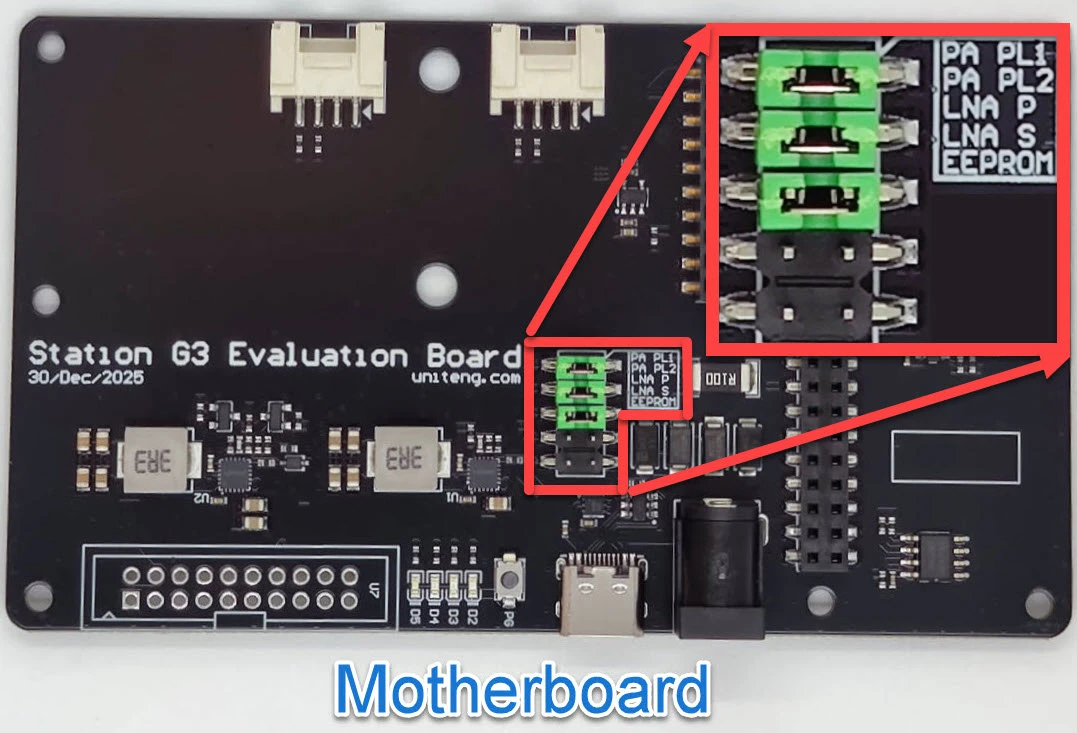
Photo: BQ Voyage. PA PL1, PA PL2, and LNA P are installed here; for MeshCore, remove PA PL1 and LNA P.
| Jumper | Set to | Why |
|---|---|---|
| PA PL1 | Removed | The firmware sets it with radio.fem.txgain |
| PA PL2 | Installed | txgain then switches between levels 2 and 4 |
| LNA P | Removed | The firmware turns the LNA on for receive and off while transmitting |
| LNA S | Removed | Reserved |
| EEPROM | Removed | Reserved |
LNA P works backwards from what you might expect: an installed jumper forces the LNA off.
The firmware cannot see the jumpers
If PA PL1 is still installed, set radio.fem.txgain off replies OK but the board stays on the higher level. Remove the jumper rather than relying on the command.
2. Set the amplifiers and TX power
Power the G3 back on, open the console over USB, and run:
set radio.fem.txgain off
set radio.fem.rxgain on
set tx 16
With PA PL2 installed, this is level 2 at about 30 dBm. For a different level, use the tables above.
radio.fem.rxgain controls the G3's external LNA. It is separate from radio.rxgain, which controls the radio chip's own receive gain.
Check the setup
get radio.fem.txgain
get radio.fem.rxgain
get tx
You should see off, on, and 16.
Troubleshooting and recovery
Error: unsupported: the firmware is not a Station G3 build, or is older than MeshCore v1.17.1. Reflash with a Station G3 build.- Output stays high after
txgain off: PA PL1 is still installed. - Weak reception: check that LNA P is removed and
get radio.fem.rxgainshowson. Turning the LNA off can help at a site with a high noise floor. - Reboots when transmitting: the supply cannot keep up. Use a supply rated at 25 W or more, at least 10 V for level 4, or drop to a lower level.
- To return to jumper-only control: power off and reinstall PA PL1 for levels 3 or 4. Only reinstall LNA P if you want the LNA off.
Finish the setup
The G3-specific settings are done. Continue with the setup for this node's role:
- Repeater: Configure the repeater, then set up its regions.
- Observer: Build a standalone MQTT observer to add Wi-Fi, your location code, and the MQTT presets.
Sources
- Station G3 wiki: power levels, jumpers, supply requirements, and output tables.
- MeshCore CLI commands:
radio.fem.txgainandradio.fem.rxgain. - MeshCore PR #3137: adds
radio.fem.txgainand applies the level at the next transmit.