Observer polling
Experimental
Polling runs on test firmware. Expect bugs, and don't put it on an observer you can't easily get to.
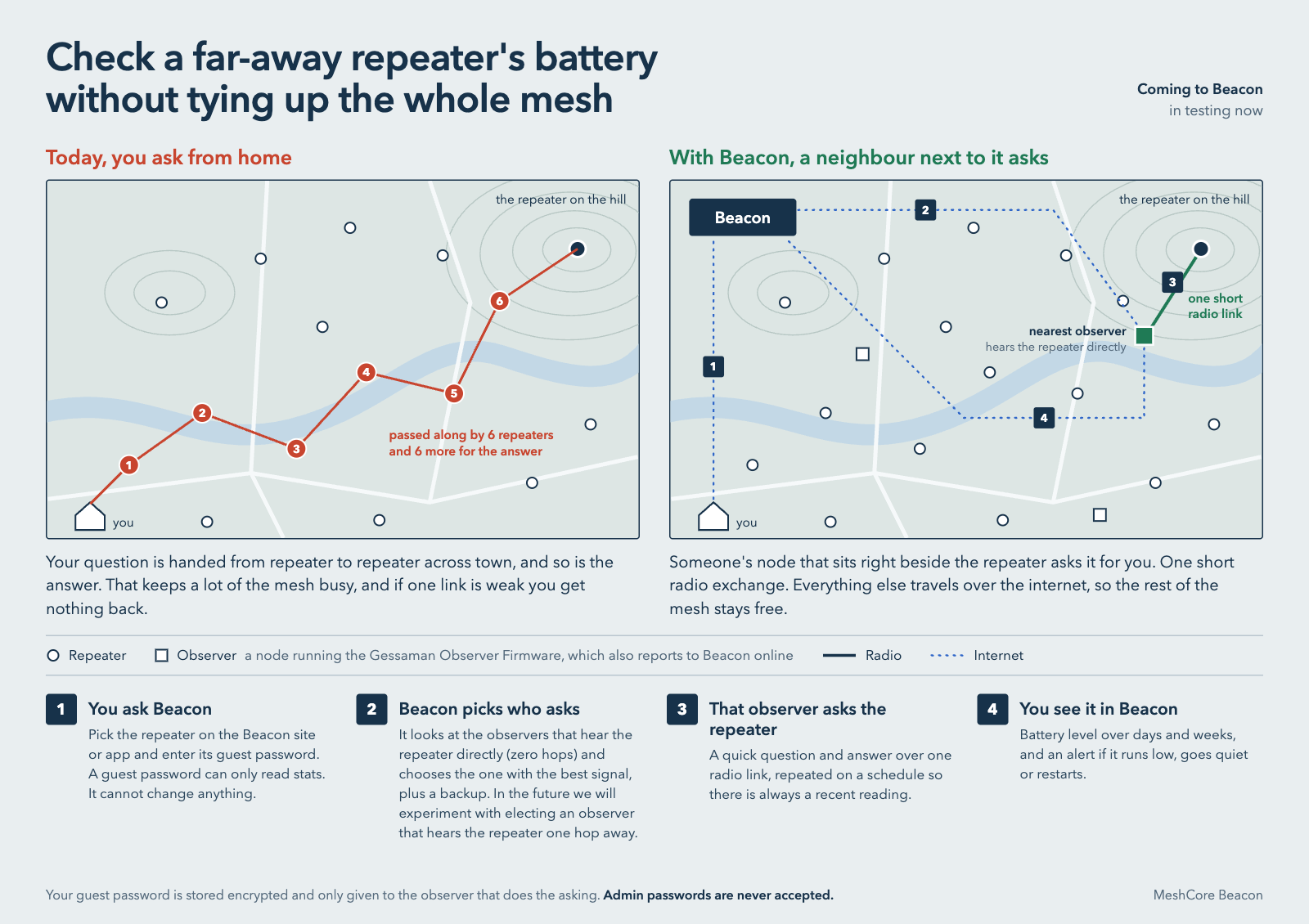
With polling on, an observer registers with MeshCore Canada Beacon (live.meshcore.ca). It only polls a repeater when someone with a Beacon account asks for that repeater to be polled. Beacon decides which observer does it: the polling observer that hears the repeater directly (zero hops) with the strongest signal. That observer asks the repeater for its battery, temperature and status about once an hour, and sends the answers to Beacon over the internet.
Why it helps
Today, to check the battery on a far-away repeater, you log in from home. Your request is passed along by every repeater in between, and so is the answer. That keeps a lot of the mesh busy, and it often fails.
With polling, an observer that hears the repeater directly asks it for you. It takes one short radio exchange.
How it works
- An observer with polling on registers with MeshCore Canada Beacon.
- Someone with a registered Beacon account asks to have their repeater polled, and types its guest password into Beacon as part of the request. The password is stored encrypted and only sent to the observer that gets the job.
- Beacon looks at the polling observers that hear that repeater directly (zero hops), picks the one with the strongest signal, and gives it the job.
- About once an hour, that observer asks the repeater for its battery, temperature and status, and uploads the answers to Beacon.
So if you run a polling observer, it may poll a zero-hop neighbour for someone else. If you run a repeater, you don't need a polling observer of your own: one nearby is enough.
- Guest passwords only. A guest password can read stats and change nothing. Admin passwords are never accepted.
- Direct neighbours only. The observer only talks to repeaters it hears directly (zero hops), so nothing is added to the rest of the mesh.
- A light touch. At most two polls per repeater per hour, one at a time.
What you need
- A board the polling firmware is built for. These are ESP32 boards with PSRAM (extra memory): Station G2, Station G3, Heltec V4 (including the expansion kit and R8 versions) and T-Beam S3 Supreme (SX1262). The Heltec V3 has no PSRAM, so it can't poll.
- Wi-Fi where the observer sits.
- Chrome or Edge on a computer, and a USB data cable.
Before you start
The first flash of the polling firmware needs Erase device, which wipes every setting on the board and its identity.
- Write down its radio settings, name and admin password.
- If the board is already in service, save its private key so it keeps its
identity: send
get prv.keyand keep the reply in your password manager. Back up a running repeater has the steps.
Set it up
The setup tool does all of this for you. Pick Repeater observer, then ESP32 with PSRAM, then answer Yes when it asks about observer polling. It gives you the flashing steps and every command to paste.
To do it by hand:
- Open the observer flasher in Chrome or Edge.
- Choose MQTT Observer Firmware, your board, then Repeater.
- In Version, choose
v1.18.0.1-poll. It isn't the newest in the list. - The first time, tick Erase device. Later updates keep your settings.
- Flash it and wait for the board to restart.
- Set it up as a repeater observer: radio, name, Wi-Fi and the two MeshCore Canada servers. What each setting does lists those lines.
-
Turn polling on:
set poll.url https://live.meshcore.ca
set poll.requests on
set poll on
set poll.requests onlets Beacon give your observer the repeaters that Beacon users ask to have polled.
Leave poll.slot and poll.consent alone. The observer finds the right MQTT
slot by itself.
Beacon sets the minimum time between polls; set poll.interval (default 60
minutes) can only make it slower. It takes 30 to 1440 minutes.
To always poll a repeater of your own, whatever Beacon asks for, add it by its public key (64 characters). The observer has to hear it directly, and it holds up to 8:
poll add <repeater public key>
By default the observer tries a blank guest password, then hello. If a
repeater uses another guest password, set it:
poll pw <repeater public key> set <guest password>
Check it works
| Command | What you should see |
|---|---|
get poll |
Polling on, mode telemetry, an MQTT slot and the repeaters it polls |
get poll.status |
One line per repeater with its last result |
get poll.status 1 |
Details for the first repeater: battery, temperature, next poll |
poll now <repeater public key> |
One poll right away (at most one a minute) |
get mqtt.status |
Ends with poll: and how many repeaters answered |
Readings show up on the repeater's page in Beacon, and the observer gets a Poller tag.
If nothing happens
get pollshows modeunknown: Beacon hasn't answered yet. Checkpoll.urland that Wi-Fi is up. Nothing is polled until the observer has set its clock over Wi-Fi.- No slot: no MQTT slot matches Beacon's servers. Check the MeshCore Canada
servers in
get mqtt.status. not_direct: the observer hasn't heard that repeater directly in the last day.login failed: the repeater doesn't accept a blank orhelloguest login. Set its guest password withpoll pw.- Polling stopped for one repeater: if a repeater lets the observer in as
admin, the observer stops polling it and gives up that access. Fix the
repeater's passwords, then send
poll enable <repeater public key>.
More help: Troubleshoot an observer.
Undo: go back to the regular firmware
Turn polling off with set poll off.
The polling firmware updates itself from the polling test channel. To go back
to the regular observer firmware, send ota branch beta, then ota update.